Understanding Form & Field Messages (Client & Server-side) in ServiceNow
I started writing a Slack message the other day about the documented gs.addInfoMessage() and gs.addErrorMessage() methods. It was supposed to be a quick “fun fact” post. That message turned into… this article. Because I fell down a rabbit-hole, and it turns out the ServiceNow docs are missing a lot of information about form and field messages.
What follows is everything I’ve been able to find about how messages work in ServiceNow - documented, undocumented, and incorrectly documented. I’ve organized it into something resembling a reference, but fair warning: I have opinions about the naming conventions, and I am not going to keep them to myself.
Form Messages vs. Field Messages
There are two kinds of messages you can show to a user on a form in ServiceNow:
Form messages are the horizontal banners that appear at the top of the form. Color-coded by type - blue for info, red for error, yellow-ish for warning, green for success, and so on. You can add these from server-side code (Business Rules, etc.) or client-side code (Client Scripts, client-side UI Actions).
Field messages show up directly under a specific field. These are client-side only. You use g_form.showFieldMsg() or the confusingly-named g_form.showErrorBox() to display them. More on that name later. I have feelings about it.
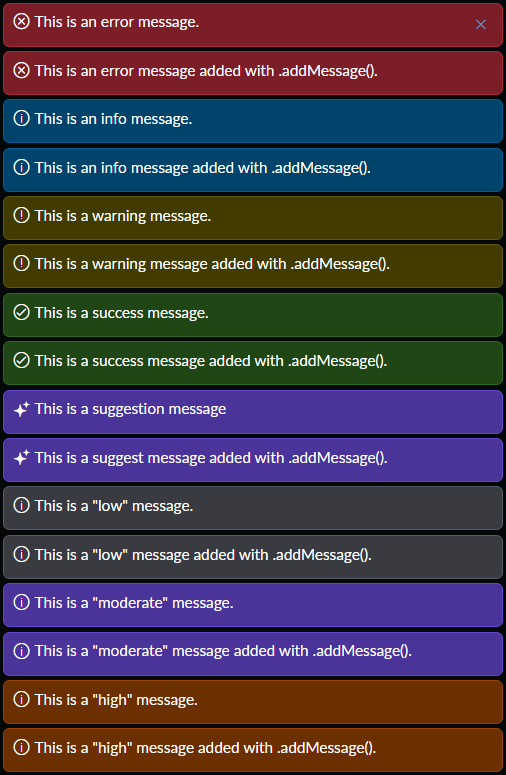
The screenshot above shows all eight server-side form message types, rendered from a Business Rule: error, info, warning, success, suggestion, low, moderate, and high. Yes, eight. The docs only tell you about two of them.
Server-Side APIs (GlideSystem / gs)
Server-side code runs in Business Rules, Script Includes, UI Actions (with “Client” unchecked), and similar. The global gs object is the GlideSystem API, and it has way more message methods than ServiceNow bothered to document.
Adding form messages (server-side)
The docs mention gs.addInfoMessage(), gs.addErrorMessage(), and gs.addMessage(type, message). That’s it. That’s what they tell you. Here’s what actually exists:
Eight convenience methods:
| Method | Documented? |
|---|---|
gs.addInfoMessage(msg) | Yes |
gs.addErrorMessage(msg) | Yes |
gs.addWarningMessage(msg) | No |
gs.addSuccessMessage(msg) | No |
gs.addSuggestionMessage(msg) | No |
gs.addLowMessage(msg) | No |
gs.addModerateMessage(msg) | No |
gs.addHighMessage(msg) | No |
Six of eight are completely undocumented. Cool.
One generic method:
gs.addMessage(typeOrMessage, message) - the docs say the type parameter accepts "info" or "error". It actually accepts all eight: info, warning, error, success, suggestion, low, moderate, high. Note: it must be the full word "warning", not "warn". I tried.
Here’s the Business Rule script I used to generate every message type, using both the convenience methods and gs.addMessage():
// Convenience methods
gs.addInfoMessage('This is an info message.');
gs.addWarningMessage('This is a warning message.');
gs.addErrorMessage('This is an error message.');
gs.addSuccessMessage('This is a success message.');
gs.addSuggestionMessage('This is a suggest message');
gs.addLowMessage('This is a "low" message.');
gs.addModerateMessage('This is a "moderate" message.');
gs.addHighMessage('This is a "high" message.');

// Same types via gs.addMessage(type, message)
gs.addMessage('info', 'This is an info message added with .addMessage().');
gs.addMessage('warning', 'This is a warning message added with .addMessage().');
gs.addMessage('error', 'This is an error message added with .addMessage().');
gs.addMessage('success', 'This is a success message added with .addMessage().');
gs.addMessage('suggestion', 'This is a suggest message added with .addMessage().');
gs.addMessage('low', 'This is a "low" message added with .addMessage().');
gs.addMessage('moderate', 'This is a "moderate" message added with .addMessage().');
gs.addMessage('high', 'This is a "high" message added with .addMessage().');
There is no gs.addFailureMessage(), by the way. No corresponding opposite of addSuccessMessage(). If something went wrong, you get gs.addErrorMessage() and you like it.
If you’re trying to count, that’s 8 convenience methods plus 1 generic method that accepts 8 different type strings. So either 9 methods or 16 method-plus-type combinations, depending on how pedantic you want to be about it.
Clearing form messages (server-side)
gs.flushMessages() clears all queued form messages for the session. The docs say it only clears messages added with addInfoMessage() or addErrorMessage(). That’s wrong - it clears all of them, regardless of which add method was used.
Also: flushMessages. Not clearMessages, not clearFormMessages, not anything that would be consistent with the client-side g_form.clearMessages(). Just… flush. Like a toilet. Alright then.
Retrieving form messages (server-side)
The docs mention gs.getInfoMessages() and gs.getErrorMessages(). They claim these return Strings.
They return Arrays.
Just kidding, they return Java ArrayLists. ಠ_ಠ
More on that particular joy in a section below.
Beyond those two, there are also undocumented getters that work:
gs.getSuccessMessages()gs.getSuggestionMessages()gs.getLowMessages()gs.getModerateMessages()gs.getHighMessages()
And the one that does not exist? gs.getWarningMessages(). There is no way to retrieve warning messages. You can add them. You can flush them. But read them back? No. There is no gs.getWarningMessages() and no gs.getWarnMessages() either. I checked both.
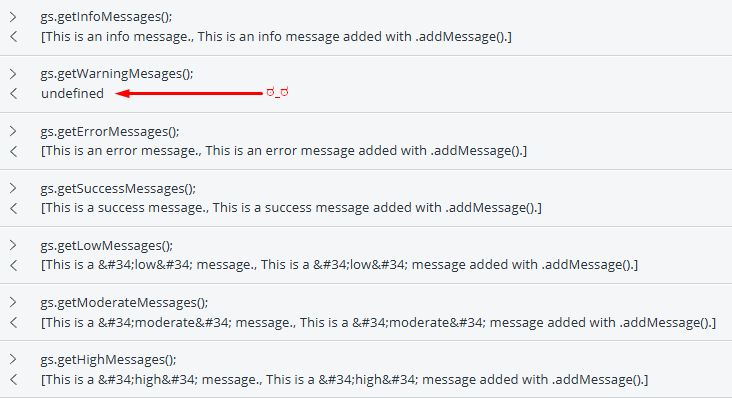
The screenshot above shows the server-side debugger output. Every getter returns its list of messages - except gs.getWarningMessages(), which returns undefined. Note the ಠ_ಠ I added to the screenshot. That was not an artistic choice; it was an emotional reaction.
Client-Side APIs (GlideForm / g_form)
Client-side code runs in Client Scripts, UI Actions with the “Client” checkbox ticked, and similar. The global g_form object is the GlideForm API.
Form messages (top of form)
g_form.addInfoMessage(msg)g_form.addErrorMessage(msg)g_form.addWarningMessage(msg)- this exists, but it’s not exactly front-and-center in the docsg_form.clearMessages()- clears all form messages
Field messages (below a field)
g_form.showFieldMsg(fieldName, message, type)- wheretypeis'info','warning', or'error'g_form.hideFieldMsg(fieldName)g_form.showErrorBox(fieldName, message)- shows an error under a fieldg_form.hideErrorBox(fieldName)
Don’t mix showFieldMsg() and showErrorBox() on the same field in the same flow; pick one and stick with it. Both of them have known issues in Service Portal, so if you’re building for portal, form-level messages (addInfoMessage / addErrorMessage) are safer.
The Naming Conventions Are Unhinged
I need to talk about this, because it genuinely bothers me.
Form-level messages use the verb add: g_form.addInfoMessage(), gs.addInfoMessage(). Fine. Makes sense. You’re adding a message.
Field-level messages use the verb show: g_form.showFieldMsg(). Okay, different verb, but I can live with it.
But then if you want to show an error under a field, the method is g_form.showErrorBox().
Error Box.
Not showFieldError(). Not showErrorMsg(). Not even showFieldMsg('field', 'msg', 'error') (which, yes, also works and is the other way to do the same thing). No - they went with Error Box. ಠ_ಠ
And then there’s the abbreviation inconsistency. Form messages use the full word: addInfoMessage, addErrorMessage. Field messages truncate it: showFieldMsg, not showFieldMessage. The hide methods are the same - hideFieldMsg, not hideFieldMessage. Was someone in a hurry that day? Did they run out of characters?
Server-side clearing is gs.flushMessages(). Client-side clearing is g_form.clearMessages(). Two different verbs for the same concept. I’d have preferred clearMessages() on both sides - or at the very least, something more dignified than “flush”.
None of this will break your code, but the next time you’re trying to remember whether the method is addErrorMessage or showErrorMsg or showErrorBox, remember: the answer is yes, all of them, and they all do slightly different things.
HTML Rendering Behavior
Form messages - both client-side and server-side - render HTML. You can do this:
gs.addInfoMessage('This is <strong>bold</strong>.');
g_form.addInfoMessage('This is <em>italic</em>.');
And the user will see bold and italic text, respectively. You can put links, lists, even inline CSS in there if you want. (I wrote a whole article about some fun things you can do with HTML in form messages.)
Field messages, on the other hand, do not render HTML. The tags show up as literal text. I also tried double-encoding the HTML entities. No dice.
Since form messages render HTML: do not pass unsanitized user input into them. If the message text comes from a field value, a URL parameter, or anything else a user can control, encode it first. Otherwise you’re building a stored-XSS vulnerability right into your form.
When to Use What
Form messages are best when the feedback applies to the record or action as a whole. Save confirmations, validation summaries, status updates after a background operation, anything that benefits from HTML formatting. They work from both server-side and client-side code, and they render in Classic UI, Service Portal, and Workspace (with some visual differences between the three).
Field messages are best when the feedback is about one specific field - a validation error on a date range, a heads-up that a reference value is inactive, that sort of thing. Putting the message right under the field keeps the user’s attention where it matters. Use g_form.showFieldMsg() for info, warning, or error; or use g_form.showErrorBox() if you only need errors (it does the same thing, it just has an awful name and no type parameter).
One important distinction: use gs.addErrorMessage() (server-side) when you want to block a save from a Business Rule and explain why. That error message will appear after the form reloads with the rejection. g_form.addErrorMessage() (client-side) is better for onSubmit validation, where you show the error and then return false to cancel the submit before it ever reaches the server.
If you’re building for Service Portal, avoid field messages entirely if you can. They have known rendering issues there. Stick to form-level messages for portal-facing work.
The gs.getInfoMessages() Return Type
The documentation for gs.getInfoMessages() and gs.getErrorMessages() says they return a String.
They do not return a String.
“Okay, so they return an Array?”
They do not return an Array either.
They return a Java java.util.ArrayList. In ServiceNow’s server-side Rhino engine, that is not a JavaScript array. It is a Java object. Which means:
infoMessages.length→undefinedinfoMessages[0]→ throws an error: “Java class ‘java.util.ArrayList’ has no public instance field or method named ‘0’”typeof infoMessages→ throws anEvaluatorExceptionbecause Rhino doesn’t know how to classify a Java typeinfoMessages.split(',')→undefined
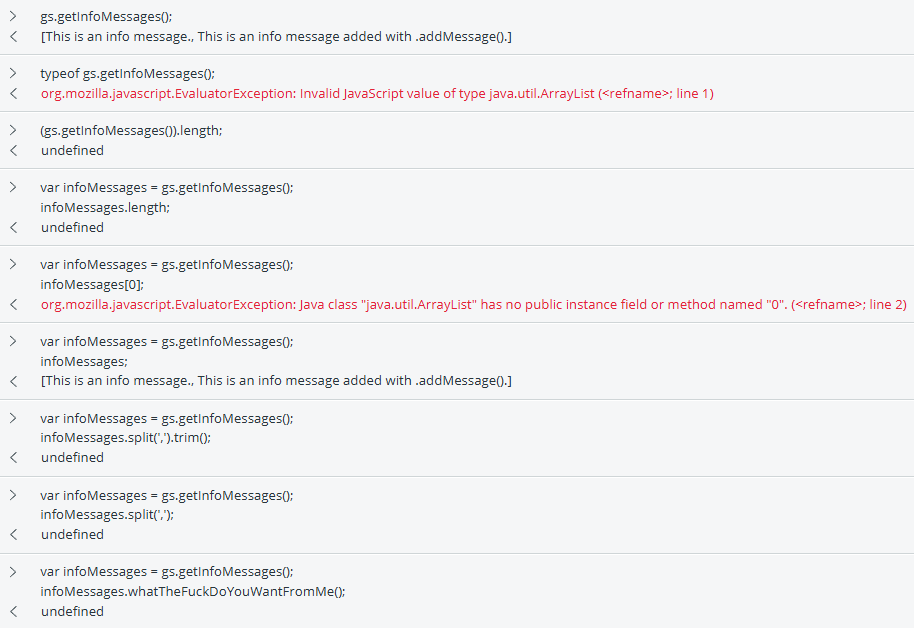
The screenshot above is me in the server-side debugger, increasingly frustrated, trying every JavaScript method I could think of. None of them work. I eventually tried infoMessages.whatTheFuckDoYouWantFromMe() out of sheer spite. That also returned undefined, which at least was consistent.
To actually work with the result, you have to treat it as a Java ArrayList - use .size() instead of .length, .get(0) instead of [0], and so on. Or you can call .toString() and parse the resulting string, which is ugly but functional.
Quick Reference
| Context | Purpose | Method | Notes |
|---|---|---|---|
| Server | Add form message | gs.addInfoMessage(msg) | Documented |
| Server | Add form message | gs.addErrorMessage(msg) | Documented |
| Server | Add form message | gs.addWarningMessage(msg) | Undocumented |
| Server | Add form message | gs.addSuccessMessage(msg) | Undocumented |
| Server | Add form message | gs.addSuggestionMessage(msg) | Undocumented |
| Server | Add form message | gs.addLowMessage(msg) | Undocumented |
| Server | Add form message | gs.addModerateMessage(msg) | Undocumented |
| Server | Add form message | gs.addHighMessage(msg) | Undocumented |
| Server | Add form message by type | gs.addMessage(type, msg) | Documented for info/error; accepts all 8 types |
| Server | Clear form messages | gs.flushMessages() | Clears all types despite docs |
| Server | Get messages | gs.getInfoMessages() | Returns Java ArrayList, not String |
| Server | Get messages | gs.getErrorMessages() | Returns Java ArrayList, not String |
| Server | Get messages | gs.getSuccessMessages() | Undocumented |
| Server | Get messages | gs.getSuggestionMessages() | Undocumented |
| Server | Get messages | gs.getLowMessages() | Undocumented |
| Server | Get messages | gs.getModerateMessages() | Undocumented |
| Server | Get messages | gs.getHighMessages() | Undocumented |
| Server | Get messages | gs.getWarningMessages() | Does not exist |
| Client | Form message | g_form.addInfoMessage(msg) | |
| Client | Form message | g_form.addErrorMessage(msg) | |
| Client | Form message | g_form.addWarningMessage(msg) | |
| Client | Clear form messages | g_form.clearMessages() | |
| Client | Field message | g_form.showFieldMsg(fieldName, msg, type) | |
| Client | Field error | g_form.showErrorBox(fieldName, msg) | Naming oddity |
| Client | Hide field message | g_form.hideFieldMsg(fieldName) | |
| Client | Hide field error | g_form.hideErrorBox(fieldName) |
See Also
- Animated Loading Message & Collapsible Details on ServiceNow Form or Field (Client-side) - does some fun stuff with HTML in form messages and animated plain-text field messages.
- Undocumented ServiceNow APIs - other undocumented APIs I’ve run into over the years.
Comments